MagOne – News & Magazine Blogger Theme | vs-8.9
₦5,500.00
- Quality assurance by WPMagic Click
- Free future updates
- Fast download
- Priority support

MagOne Blogger WordPress Theme
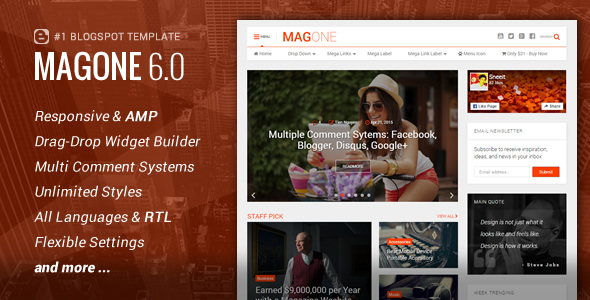
With MagOne Blogger WordPress Theme you only purchase once and receive a beautiful modern website with multiple layouts, but you also gain access to lifetime updates at no extra cost, making this an excellent value WordPress themes for Magazine, Lifestyle, Newspaper or Portfolio style websites.
MagOne Blogger WordPress Theme is Here
MagOne Blogger WordPress Theme is Here has also been designed with your content front of mind. With so many prebuilt layouts and our easy to use 1-Click install, designing your website couldn’t be easier. Flexibility and affordability combined in one easy to use web design package.
The Core of MagOne Blogger WordPress Theme
Coded with HTML5 & CSS3, all of MagOne’s features, such as animations and effects, are elegant and purposeful, not cluttered and overbearing, with a focus on your content first. Choose a design layout that suits you from one of our pre-built pages, or create your own exactly how you imagined it with the easy to use Drag & Drop Page builder that comes with the Sneeit Framework.
MagOne Blogger WordPress Theme stunning prebuilt ready made Demos:
- Tech Magazine
- Fashion Website
- Trending News
- Flat Design
- Affiliate Marketers Blog
- Ecommerce Store
- Music Website
- Lifestyle Website
- Writers Website
- Creative Portfolio Website
🔹 FOR WORDPRESS THEMES
HOW TO USE
- After Purchase on wpmagicclick.com.ng
- Login to wpmagicclick.com.ng
- Go to your My account
- Go to Download
- Download the plugin ZIP file.
- Go to WordPress Dashboard
- Appearance
- Themes
- Add New
- Upload Theme.
- Upload the ZIP File
- Click Install
- Activate after Installation
- Import demo content (if included).
- Customize via Appearance → Customize or Elementor.
🔹 FOR WORDPRESS PLUGINS HOW TO USE
- After Purchase on wpmagicclick.com.ng
- Login to wpmagicclick.com.ng
- Go to your My account
- Go to Orders
- Download the plugin ZIP file.
- Login to Your WordPress Dashboard
- Go to Plugins
- Add New
- Upload Plugin.
- Upload the ZIP and click Install → Activate.
- Open the plugin settings from the left sidebar menu.
- Configure options and start using.
✓ Quality assurance by WPMagic Click
✓ Free future updates
✓ Fast download
✓ Priority support
::::::::::::::::::::::::::::::::::::::::::::::::::::::::::
| Last Update | 15 Dec, 2025 |
| Live Preview: | Here |
| License | GPL |
| Published | 8 Years ago |
::::::::::::::::::::::::::::::::::::::::::::::::::::::::::